Skip to navigation Skip to main content
ADD ANYTHING HERE OR JUST REMOVE IT…
  • Prism V2G
  • Silla App
  • B2B
    • Silla Partners
    • OEM
  • News
    • Articles
    • Press Releases
    • Newsletters
    • Photo
  • Support
  • Shop
  • Company
    • Contacts
    • Work with us
    • Manifesto
0 items €0,00
  • English
    • Italian
    • French
    • Spanish
Menu
0 items
  • English
    • Italian
    • French
    • Spanish

Centro Assistenza

Video

4
  • Authentication with RFID key
  • How to Install PRISM SOLAR
  • How to Install PRISM BASIC
  • Upgrade from PRISM BASIC to PRISM SOLAR [VIDEO].

Prism

13
  • FAQ
    • I have multiple PV systems connected to the same home system. Can Prism take the energy produced by only one of them?
    • Can Prism also recharge light commercial vehicles?
    • Which storage systems are compatible with Prism?
    • How can I pair Prism with a Tesla Powerwall?
    • What should I do if the Prism WiFi network is no longer visible?
    • Does Prism talk to external meters other than the Smart Meter?
  • How to...
    • OCPP
    • Guide on the operation of LEDs: Prism Solar S
    • Guidance on the operation of Prism Solar’s touch button
    • Guide on the operation of the touch button of Prism Solar S
    • Guide on the operation of LEDs: Prism Solar

Charge.to.it

1
  • Can the motorist request an invoice for the recharge made?
  • Home
  • Centro assistenza
View Categories

OCPP

0:00 / 2:12
  • View as Markdown Open this page as plain Markdown (opens in a new tab)
  • Export PDF Download this page as a PDF
  • Open in ChatGPT Ask questions about this page (opens in a new tab)
  • Open in Claude Ask questions about this page (opens in a new tab)
  • Open in Google AI Studio Ask questions about this page (Google account required) (opens in a new tab)

Introduction

OCPP (Open Charge Point Protocol) is a communication protocol that enables communication between charging systems such as Prism Solar and a charging point management server, called Central System.

Through OCPP, the Central System can control and manage the various recharge points for operations such as recharge reporting, authorization through RFID cards, and management of recharge rates. OCPP is therefore suitable for all those scenarios where it is necessary to manage multiple recharge points, also installed in different locations and geographic areas, and to account for recharges.

OCPP is also critical in all contexts in which CPOs (Charge Point Operators) and eMSPs (e-Mobility Service Providers) that provide charge point management services via the OCPP protocol operate.

Refer to the Technical Features chapter for technical features related to OCPP.

Configuration

OCPP configuration requires only the configuration of the parameters of the Central System you wish to connect to.

Central System data to be used during configuration, such as URL and Serial Code should be requested from the Central System manager.
  1. Connect to Prism’s WiFi network and visit http://192.168.8.1/benvenuto:
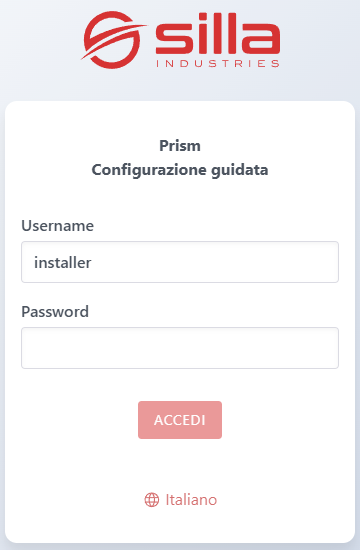
  2. Enter the “installer” login credentials and scroll down the Guided Configuration page to the Communication via OCPP section:

  3. Press on the drop-down menu and select “Enable” to enable the compilation of the parameters to be configured:
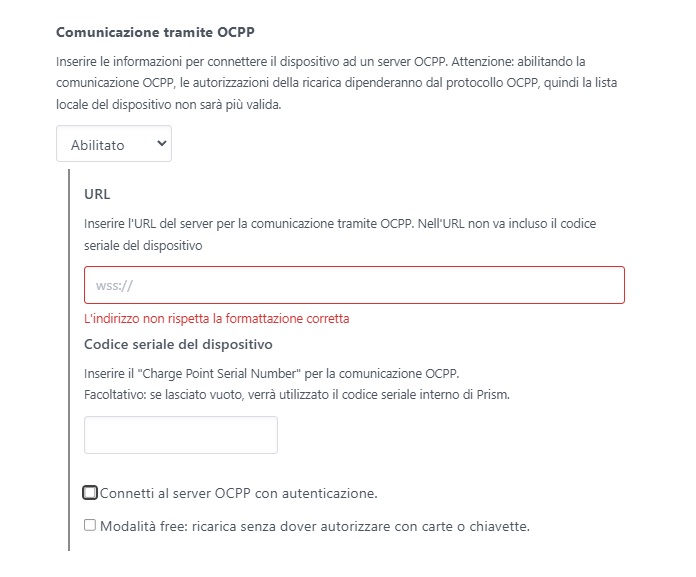
  4. Configure OCPP parameters:
    • URL: OCPP Central System URL.
    • Device serial code: also called Charge Point Serial Number, a serial code that identifies the Prism.
    • Authentication: in case the Central System requires authorization, check the corresponding value and enter user and password provided by the manager.
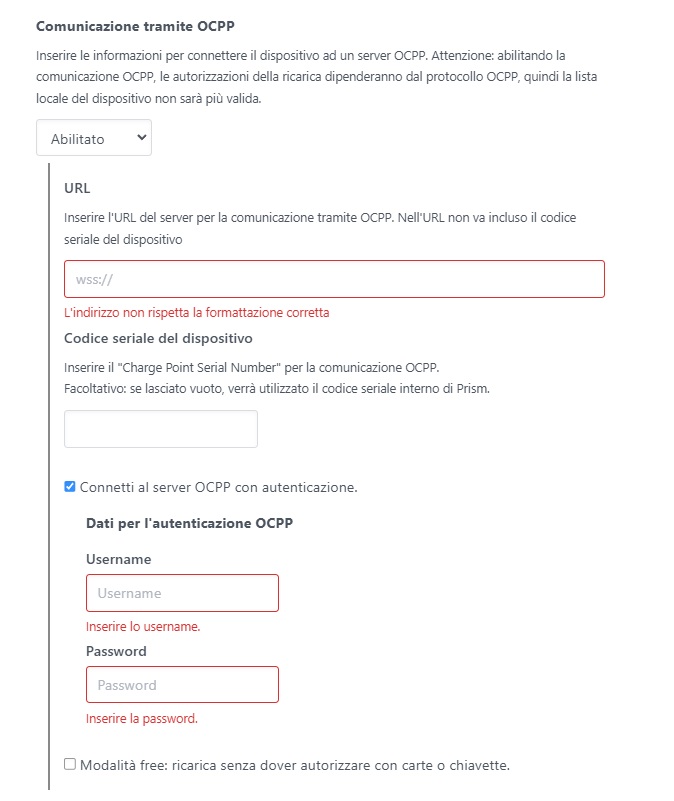
  5. Press “Next.”

Specifications

The following are the technical characteristics of OCPP for Prism Solar and Solar S.

Features – Feature Profiles

The feature profiles supported by Prism Solar and Prism Solar S are:

  • Core.
    • Basic functionality for starting, authorization, configuration, transaction and remote control of EVSE.
  • Firmware Management.
    • File management and remote Firmware update.
  • Local Auth List Management.
    • Local authorization management for recharge-enabled users.
  • Reservation.
    • Support for reserving a charging connector.
  • Remote Trigger.
    • Support for triggering messages from EVSE to receive the latest information or to resend messages.

Configurations – Configuration Keys

Configuration KeyValue
GetConfigurationMaxKeys10
LocalAuthListMaxLenght10
SendLocalListMaxLenght10
WebSocketPingInterval60

Security – Security Profiles

Cipher suite:

  • TLS_ECDHE_ECDSA_WITH_AES_128_GCM_SHA256 & TLS_ECDHE_ECDSA_WITH_AES_256_GCM_SHA384.

Security profile:

  • Security Profile 1 – Unsecured Transport with Basic Authentication.
  • Security profile 2 – TLS (1.2 or higher) with Basic Authentication.

Share This Article :

  • Facebook
  • X
  • LinkedIn
  • Pinterest
Tabella dei contenuti
  • Introduction
  • Configuration
  • Specifications
    • Features - Feature Profiles
    • Configurations - Configuration Keys
    • Security - Security Profiles

Silla srl
Via Lisbona 44
35127 Padova (PD) Italia
info@silla.industries

P.IVA 04439570278
Iscrizione Registro AEE n. IT20060000012223

Orario d’Ufficio: 08:00 – 17:00
Per informazioni commerciali:
Email: vendite@silla.industries

Per assistenza tecnica:
Web: silla.industries

Per chattare con noi:
WhatsApp: +39 339 990 7755
(solo chat)

Per amministrazione:
Email: amministrazione@silla.industries

Orario d’Ufficio: 08:00 – 17:00
Per informazioni commerciali:
Email: vendite@silla.industries

Per assistenza tecnica:
Web: silla.industries

Per chattare con noi:
WhatsApp: +39 339 990 7755
(solo chat)

Per amministrazione:
Email: amministrazione@silla.industries

  • Privacy Policy
  • Cookie Policy
  • Terms of sale
  • Richiedi il recesso
  • Contacts
  • Privacy Policy
  • Cookie Policy
  • Terms of sale
  • Richiedi il recesso
  • Contacts

Privacy Policy       Cookie Policy
Condizioni di vendita

© 2026 Silla Srl
Start typing to see posts you are looking for.
Close
  • Prism V2G
  • Silla App
  • B2B
    • Silla Partners
    • OEM
  • News
    • Articles
    • Press Releases
    • Newsletters
    • Photo
  • Support
  • Shop
  • Company
    • Contacts
    • Work with us
    • Manifesto
Shopping cart
Close
Shop
0 items Cart
  • Italian
  • French
  • Spanish